Is Arial Narrow on Google Fonts? No, but These 6 Come Close
Last reviewed by the ArialNarrow.com editorial team
Short answer
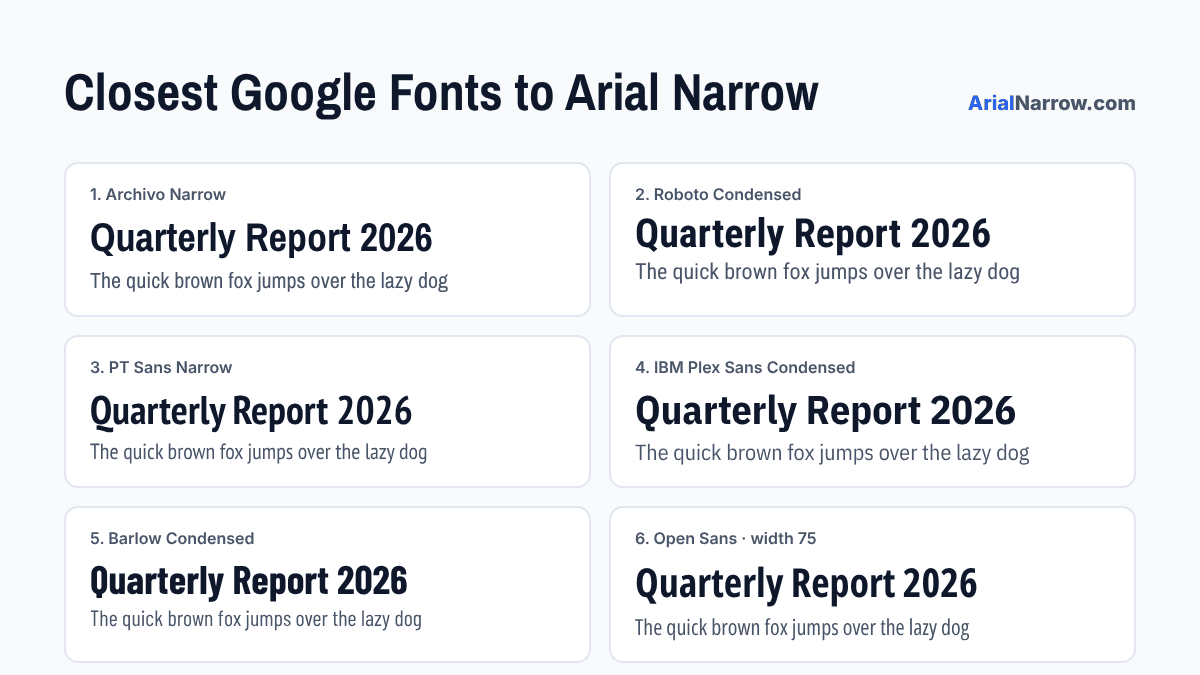
No. Arial Narrow belongs to Monotype, and Google Fonts only carries open-source fonts. The closest free match on Google Fonts is Archivo Narrow, followed by Roboto Condensed. Both are free for commercial use and take one line of code to add to a website.
What to look for in a substitute
Arial Narrow does three things well: it saves space, it keeps a tall x-height so small text stays readable, and it looks plain enough to disappear into a layout. A good substitute should do the same. Pure display fonts like Oswald or Bebas Neue save even more space, but they're too loud for table data or body text.
Width matters most if you're matching an existing design. None of these fonts share Arial Narrow's exact widths, so text will reflow slightly. If you need identical line breaks, Google Fonts can't help. For sources beyond Google, see our list oflegal free font sites. For an exact width match, useLiberation Sans Narrow instead.
1. Archivo Narrow
Closest overallSimilar weight, similar rhythm, and the same no-nonsense grotesque feel. If you only try one, try this.
View Archivo Narrow on Google Fonts →<link rel="stylesheet" href="https://fonts.googleapis.com/css2?family=Archivo+Narrow:wght@400;700&display=swap">2. Roboto Condensed
Close, a bit rounderSlightly softer curves and much wider weight range. The safest pick for apps and dashboards.
View Roboto Condensed on Google Fonts →<link rel="stylesheet" href="https://fonts.googleapis.com/css2?family=Roboto+Condensed:wght@400;700&display=swap">3. PT Sans Narrow
Same width, warmerA humanist design, so letters look friendlier. Reads well in longer passages.
View PT Sans Narrow on Google Fonts →<link rel="stylesheet" href="https://fonts.googleapis.com/css2?family=PT+Sans+Narrow:wght@400;700&display=swap">4. IBM Plex Sans Condensed
Same job, more technicalCrisp and engineered, with excellent figures for tables. Great for data-heavy products.
View IBM Plex Sans Condensed on Google Fonts →<link rel="stylesheet" href="https://fonts.googleapis.com/css2?family=IBM+Plex+Sans+Condensed:wght@400;700&display=swap">5. Barlow Condensed
Narrower, more characterSqueezes even more onto a line. Best for headlines, scoreboards and signage.
View Barlow Condensed on Google Fonts →<link rel="stylesheet" href="https://fonts.googleapis.com/css2?family=Barlow+Condensed:wght@400;700&display=swap">6. Open Sans (condensed width)
Looser and more openUse the variable width axis set to 75. Very readable at small sizes on screens.
View Open Sans on Google Fonts →<link rel="stylesheet" href="https://fonts.googleapis.com/css2?family=Open+Sans:wdth,wght@75,400;75,700&display=swap">
Keep Arial Narrow first in your font stack
You don't have to give up Arial Narrow completely. List it first, then your Google font. Visitors who have Arial Narrow installed will see it, and everyone else gets the free substitute:
font-family: 'Arial Narrow', 'Archivo Narrow', sans-serif;The catch: your site will look slightly different on Windows and on Mac. If consistency matters more, put the Google font first.
Frequently Asked Questions
Why isn’t Arial Narrow on Google Fonts?
Google Fonts only hosts fonts released under open licenses such as the SIL Open Font License. Monotype owns Arial Narrow and sells it commercially, so Google has no right to serve it.
Is Arimo the same as Arial Narrow?
No. Arimo, which Google Fonts does host, matches the widths of regular Arial, not Arial Narrow. It has no narrow or condensed version, so it won’t save any space.
Can I upload Arial Narrow to my own site instead?
Only with a Monotype web-font license. The copy that comes with Microsoft Office is licensed for documents, not for serving to website visitors.
Should I load these fonts from Google or host them myself?
Either works. Self-hosting gives you full control and avoids a request to Google’s servers, which some privacy laws care about. The Google CDN is quicker to set up. Every font on this list allows both.